v1.0.0 / released

Wipe disks before you recycle them.

Single-file Windows utility. No installer, no nag screens, no upsell. Built because I didn't want to pay for a bloated commercial wiper to do something Windows can already do, just with a worse UI.

VERIFIED CLEAN

Live progress, throughput graphs, and a verification pass.

Per-block speed, stall detection, and tamper-evident certificates. If something's wrong with a wipe, you'll see it while it's happening, not find out later when the cert doesn't match.
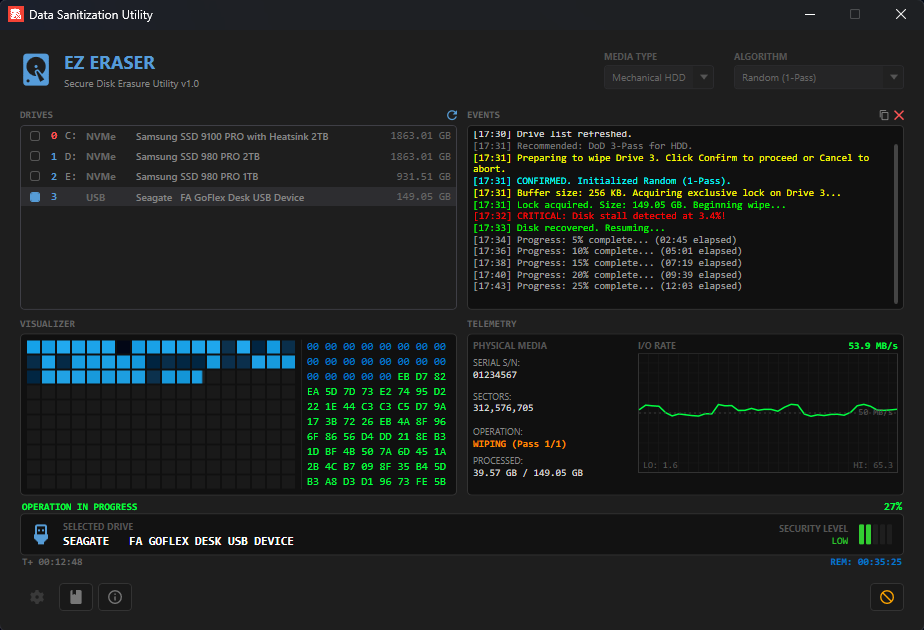
EZ Eraser main view showing live wipe in progress

Resume capability

Wipes survive power loss, app crashes, and USB disconnects. State is saved every five seconds, so you can pick up where you left off, even days later. Resume tracking matches drives by serial, model, and capacity, so swapping drives between sessions can't apply state to the wrong target.

stored in %APPDATA%\EZEraser\
// resume_state.json
{
  "DriveModel": "Samsung 980 PRO 1TB",
  "Algorithm": "DoD 5220.22-M",
  "CompletedPasses": 2,
  "CurrentPassOffset": 87432130560,
  "LastSavedAt": "2026-05-03T22:11Z"
}

Hardware Secure Erase

For NVMe and SATA drives that support it, EZ Eraser issues firmware-level erase commands instead of software overwrites. NVMe Format with Crypto Erase is near-instant on self-encrypting drives. ATA SECURITY ERASE UNIT clears over-provisioned cells that overwrites can't reach.

IOCTL_STORAGE_PROTOCOL_COMMAND • IOCTL_ATA_PASS_THROUGH
// nvme format command
opcode = 0x80
SES = 2 // crypto erase preferred
fallback = 1 // user data erase

// drive performs erase internally
// no software overwrites needed

Per-algorithm verification

The verification pass knows what your wipe was supposed to write. Zero Fill verifies all-zeros. VSITR verifies the 0xAA terminator. Random and DoD verify high entropy. Catches drive cache failures, silently skipped bad sectors, and write-pretending USB enclosures.

unique-byte threshold • locale-independent error detection
// verification dispatch
ZeroWipe → AllZeros
VSITR → AllAA
NIST 800-88 → HighEntropy
DoD 5220.22-M → HighEntropy
Gutmann → HighEntropy
Secure Erase → None

Tamper-evident certificates

Each completed wipe generates an HTML certificate of destruction with a SHA-256 hash computed over drive metadata, algorithm, timestamps, and result. Modify any field on the visible cert and the hash won't match on recomputation, exposing the tampering.

SHA-256 over canonical record
// certificate hash payload
hash = SHA256(
  model + "|" +
  serial + "|" +
  capacity + "|" +
  algorithm + "|" +
  startTime + "|" +
  endTime + "|" +
  result
)

Check a drive without writing to it.

Bought a used drive and want to know if it's actually clean? Audit mode reads every sector and reports clean vs dirty without modifying a single byte.
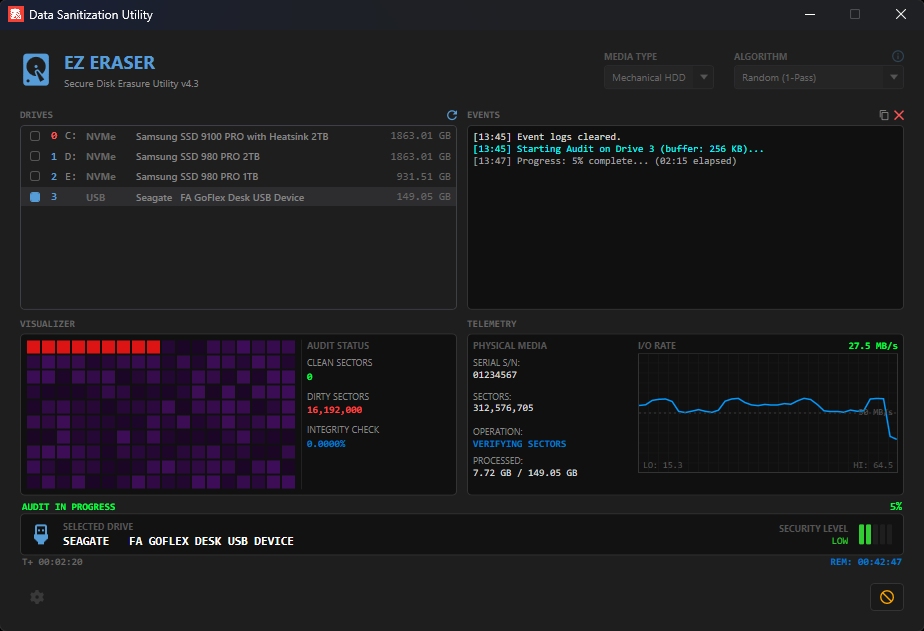
EZ Eraser audit view

Ten algorithms.

Most modern drives need a single pass. The multi-pass methods are here for compliance frameworks that pre-date current hardware, not because they're more secure.

Zero Fill
1 pass
Quick erase for non-sensitive data
Writes 0x00 to every sector. Fast, defeats casual file recovery. Adequate for personal drives where forensic recovery isn't a realistic threat.
Low
Random
1 pass
General-purpose single-pass
Overwrites with cryptographically random data. Indistinguishable from encrypted data, making partial recovery effectively impossible on modern drives.
Low
NIST SP 800-88
1 pass
Current US federal standard, recommended for SSDs
"Clear" sanitization per NIST guidelines. Single random-data pass is considered sufficient for all post-2001 drives, including SSDs where multi-pass overwrites can damage flash cells without improving security.
Low
DoD 5220.22-M
3 passes
Mechanical HDDs, older compliance frameworks
Writes a character, its complement, then random data. Originally specified for magnetic media to defeat residual magnetism analysis. Often required by legacy compliance audits.
Medium
RCMP TSSIT OPS-II
7 passes
Canadian government standard
Royal Canadian Mounted Police technical security standard. Alternates fixed values with their complements across seven passes, ending with a verification pass.
Medium
HMG IS5 Enhanced
3 passes
UK government standard
Her Majesty's Government Infosec Standard 5. Writes 0x00, 0xFF, then random data with verification. Used for UK public sector data destruction requirements.
Medium
Schneier
7 passes
High-security HDDs
Designed by Bruce Schneier in 1996. Two fixed-value passes followed by five passes of cryptographically random data. Built on the assumption that attackers may have access to magnetic-force microscopy.
High
VSITR (German BSI)
7 passes
European data compliance
German Federal Office for Information Security (BSI) standard. Six alternating-value passes followed by a 0xAA terminator pass for unambiguous verification. Common requirement for EU privacy compliance.
High
Gutmann
35 passes
Legacy MFM/RLL drives, overkill for modern hardware
Peter Gutmann's 1996 method targeting specific encoding patterns of pre-2001 magnetic media. Gutmann himself has said it's unnecessary for modern drives. Included for completeness and audit checkboxes.
Extreme
Secure Erase
firmware
NVMe and SATA drives that support ATA/NVMe commands
Drive firmware performs the erase internally. NVMe Format with Crypto Erase is near-instant on self-encrypting drives. ATA Secure Erase clears over-provisioned and reallocated sectors that software overwrites cannot reach.
Hardware
For modern drives: NIST SP 800-88 Clear or single-pass random is sufficient. Multi-pass methods don't add security on drives manufactured after about 2001, they exist for regulatory compliance with frameworks that pre-date that hardware shift.

Single file. No install.

version
v1.0.0
size
~70 MB
platform
Windows 10/11 x64
runtime
none required
SHA-256 / DiskWipper.exe
22FE4D1112B32831866136426ADECA9465CE80D0C720AC8A7E874E52B227C263
SmartScreen warning on first run
Windows shows "Windows protected your PC" because the binary isn't signed. Code signing certificates run a few hundred dollars a year, which is a lot for a hobby project. Click More info, then Run anyway. Verify the SHA-256 hash above against your downloaded file if you want to confirm integrity.
# verify in PowerShell:
Get-FileHash -Algorithm SHA256 .\EzEraser.exe

Found a bug? Got an idea?

This is a hobby project, but I read every issue and email. Bug reports, feature requests, and weird-edge-case drives are all welcome.